DC UNIVERSE INFINITE
- 3.3
- Rating
- 5.00M
- Installs
- Free
- Price

 Analysis by App-foxy
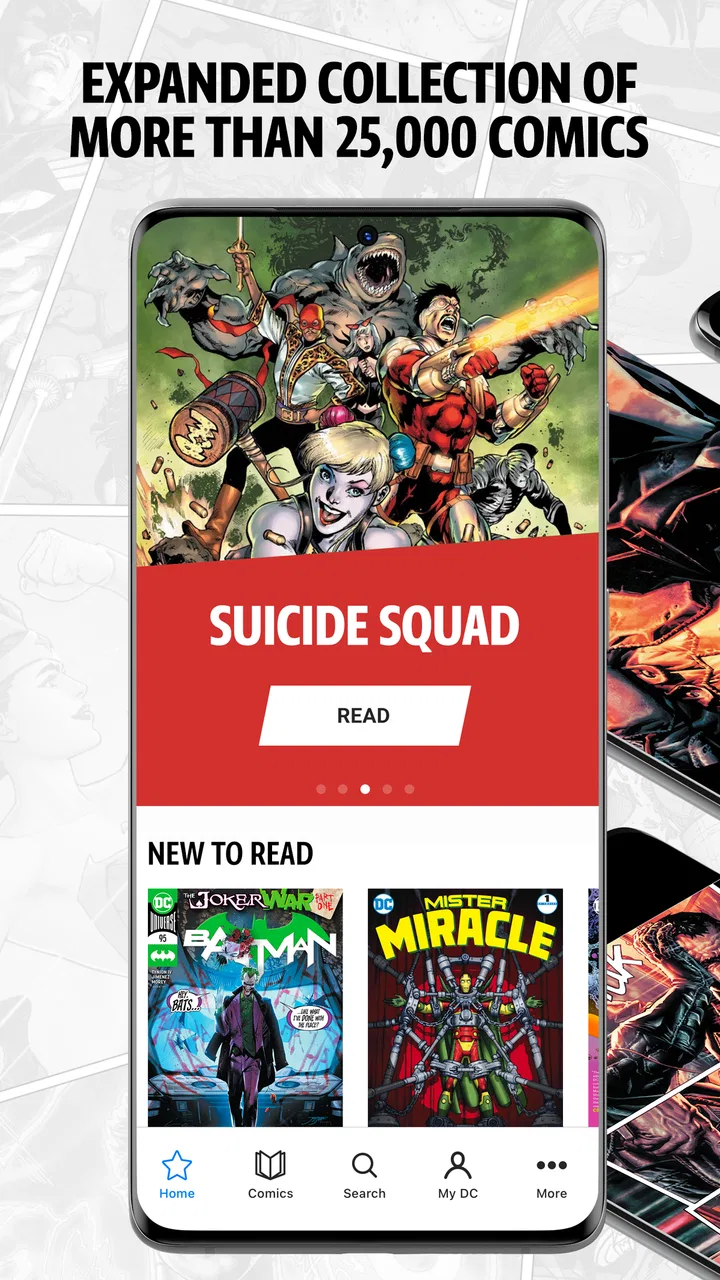
DC UNIVERSE INFINITE is the kind of comics app I open when I want to read within the DC world without choosing a single collected book first. Its central appeal is straightforward: it brings a very large selection of DC comics into one reading service, rather than making me search through separate digital purchases title by title. That sounds simple, but it changes how I browse. I can begin with a character, era, or curiosity and let the library guide me instead of planning my reading in advance.
After spending time with it, my view is that the app is strongest as a discovery tool for committed DC readers. It is less convincing for someone who only wants an occasional comic or expects every issue to be immediately available. The experience depends heavily on how much you value access to a broad publisher-specific library, and whether you are comfortable with the limits that come with a subscription-style comics catalog.
Why the large DC library matters more than the app itself
The most important capability here is not a flashy reader effect. It is the scale and focus of the collection. DC UNIVERSE INFINITE concentrates on DC material, so the service makes more sense to a reader who regularly moves between Batman, Superman, Wonder Woman, Justice League stories, and the wider range of characters connected to that universe. Instead of treating each comic as an isolated purchase, it encourages me to think in terms of an ongoing reading journey.
You May Also Like

 AccuWeather: Weather Radar
AccuWeather Review: A Quick, Clear Forecast for Everyday Decisions
For everyday plans, the best forecast is the one you can understand quickly. AccuWeather makes rain timing, radar, and local conditions easy to act on, with a few trade-offs.

 Hill Climb Racing
Why Hill Climb Racing Still Turns Crashes Into One More Run
A tiny car, a bumpy hill and one more upgrade: Hill Climb Racing keeps resurfacing because its simple chaos makes every near-miss feel personal.

 AliExpress - Shopping App
AliExpress Makes Global Shopping Feel Personal, but Shoppers Bear the Risk
AliExpress turns a global marketplace into a pocket-sized discovery engine. Its reach is useful, its shopping loop compelling, and its trade-offs easy to miss.

 Lords Mobile: Kingdom Wars
Lords Mobile Is a Kingdom-Building Routine, Not a Quick Match
A case-by-case verdict on the building, battles, device demands, and social commitments that make Lords Mobile rewarding for some players and exhausting for others.

 PDF Scanner app - TapScanner
TapScanner Makes Paperwork Easier to Capture, Check, and Share
TapScanner makes scanning with a phone feel less like a rescue operation and more like a dependable step in getting work done. Its capture tools are useful, though not flawless.

 Block Blast!
 Shows How Much a Puzzle Game Can Leave Out
A quiet grid game shows why puzzle players increasingly value instant clarity, repeatable skill and low-pressure play—and where the genre still needs to catch up.
More From Our News Desk
View All News


That distinction matters because superhero comics are often difficult to approach in a neat order. A character may appear in a solo series, a team book, a crossover, a special issue, and a later relaunch. With a broad catalog in one place, I can follow a character’s development, compare different creative periods, or investigate the story behind a scene I remember from a film or television adaptation. The value is not just having more pages available; it is having enough surrounding material to make exploration worthwhile.
The app is developed by Warner Bros. International Enterprises, and its identity is tightly tied to the DC brand. I would not install it expecting a mixed publisher platform or a general comics marketplace. That narrow focus is its main strength and its first important limitation. If DC is the publisher I read most, the specialization feels useful. If my reading jumps equally between Marvel, independent publishers, manga, and graphic novels, I would need another service alongside it.
The store summary describes it as offering the largest selection of DC comics in one place. I would treat that as a description of its purpose rather than a promise that every possible issue will appear at the same time. A digital catalog can be broad while still requiring readers to check whether a particular run, recent release, or special edition is currently accessible. That expectation keeps the experience realistic and prevents disappointment when a search does not lead to the exact issue I had in mind.
For me, the greatest benefit is the reduction in decision friction. When a title catches my attention, I can investigate nearby stories without immediately calculating the cost of buying several individual volumes. That makes the service especially appealing for back-catalog reading, character research, and catching up on series I have ignored for years. It also makes it easier to abandon a story that is not working for me and try something else.
Browsing becomes part of the reading experience
Traditional digital comic stores are often built around ownership: find a book, pay for it, and keep it in a personal library. That model is better when I know exactly what I want and only plan to read a small number of books. DC UNIVERSE INFINITE is more attractive when I want to browse broadly. I can approach it like a personal DC shelf that I keep revisiting, rather than a checkout counter.
That difference changes how I recommend using it. I would not begin by searching for one famous storyline and judging the whole app from that single result. I would first choose a reading theme, such as a character’s major appearances or a particular period of DC publishing, and then see how much material the catalog gives me to work with. The service shows its value when the reader follows several paths instead of stopping after one book.
A useful habit is to keep a short list of “next reads” outside the app while browsing. Large libraries can create the opposite of convenience: too many plausible choices. I find it easier to note a few candidates, start one, and return to the list only after deciding whether the story deserves more time. This avoids spending longer selecting than reading, especially when I am exploring an unfamiliar character.
What reading feels like in everyday use
In practice, the app works best when I treat it as a flexible reading companion rather than a replacement for every form of comic ownership. I might open it during a commute, read a few pages while waiting, or settle in for a longer session at home. The important change is that I do not have to carry a physical stack of books or decide which individual digital purchase is worth making before I can explore.
That convenience is particularly useful for sampling. Suppose I have heard about a Batman storyline but do not know whether its tone suits me. With a broad DC-focused service, I can investigate related material and move on if it is not a match. The same applies to older runs that are difficult to find in local shops. The app turns that initial research stage into part of the reading experience.
My preferred workflow is to start with a clear question: “Where should I begin with this character?” or “What came before this event?” I then use the catalog to build a small route instead of opening random issues indefinitely. This approach makes the breadth manageable. It also helps reveal a trade-off: a huge selection is valuable only when the reader is willing to organize it personally.
Reading on a phone is convenient, but page-heavy comics still require attention. I would choose a larger screen when I want to appreciate detailed artwork, crowded panels, or double-page compositions. A phone is excellent for short sessions and portability, while a tablet or larger device is more comfortable for a full evening. The app’s value is therefore connected to where and how you read, not just what is in the catalog.
Another practical point is continuity. If I begin a long sequence casually, I can lose track of which issue or related story I intended to read next. I recommend finishing each session by noting the title and issue that should follow. This small habit is more useful than relying on memory, especially when moving between solo books and team stories. It turns a potentially overwhelming catalog into a personal reading plan.
A realistic evening with the catalog
Imagine that I have just watched a DC adaptation and want more of a character, but I do not yet know whether I prefer modern stories or older interpretations. I could spend the evening searching for one exact graphic novel elsewhere, or I could use this app to sample several connected directions. I might read an introductory issue, compare it with an earlier version of the character, and then follow a team appearance.
That scenario shows the app’s real effect. It does not merely make one comic available; it lowers the effort required to compare different entry points. For a newcomer, that can make DC feel less intimidating. For an experienced reader, it can support a deeper dive into overlooked material. The best result comes when I use the catalog to answer a specific curiosity rather than expecting it to choose a perfect reading order for me.
It is also a good fit for readers who revisit favorites. A physical collection may remain the better choice for display and permanent ownership, but the app is easier when I want to check a scene, reread a short arc, or compare how a character is portrayed across different stories. That kind of quick return visit is where a broad digital library feels more useful than buying another complete volume.
Where the convenience comes with conditions
The first friction is the rating. The app holds a 3.4 average from around 20 thousand ratings, alongside roughly 7.4 thousand written reviews. I would not use those figures as a final verdict, but they do suggest that the experience is not universally smooth for every reader. A large catalog can be impressive while the overall app experience still depends on navigation, availability, reading comfort, and expectations about access.
The service is free to install, but in-app purchases range from $3.99 to $119.99 per item. That is important because “free” describes the download, not necessarily unlimited reading without payment. Before committing to a long reading plan, I would inspect how access is presented in the app and decide whether the available purchase structure suits my habits. Someone who reads one or two comics occasionally may prefer buying specific books elsewhere, while a frequent DC reader may find broader access more worthwhile.
I also would not assume that a subscription-oriented library is identical to owning digital editions. Access-based reading is convenient, but it does not give me the same feeling as having a permanent personal collection that I can organize independently. If I care about collecting particular covers, preserving favorite editions, or supporting a long-term shelf of selected books, individual purchases or physical collections may be a better fit.
Catalog breadth can create another problem: choice overload. A new reader may search for Superman and see many possible starting points without knowing which one is most suitable. The app is not automatically a reading guide. My solution is to begin with a short arc, a well-defined character goal, or a recommendation from someone whose taste I trust. I would avoid starting with a massive crossover unless I already understand the characters involved.
There is also a difference between reading casually and reading analytically. If I am studying artwork, lettering, or page composition, a larger display and a carefully chosen edition may serve me better. The app is excellent for access and discovery, but dedicated collectors may still prefer physical books or individually owned digital editions for close comparison and permanent reference.
The Teen content rating is another useful signal for families. I would not treat the app as a children’s comics shelf simply because superheroes are familiar. Parents should consider the maturity of the specific stories their child is choosing, especially when the catalog spans many characters, tones, and publishing periods. A teenager who already reads DC may find the rating appropriate, but younger readers still benefit from adult guidance when selecting titles.
Small habits that make the service easier to use
My first tip is to separate discovery from commitment. Browse freely, but do not build a huge queue immediately. Save or note only the stories that genuinely interest you, then test one short reading path. This avoids turning the app into an endless list of unfinished possibilities.
My second tip is to use character relationships as a map. If a solo title feels confusing, look for a team story or a related appearance that gives more context. DC’s interconnected universe can be rewarding, but the connections are easier to follow when I use them selectively rather than trying to read everything in publication order.
My third tip is to match the device to the material. I use a phone for a quick chapter or a few pages, but I prefer a larger screen for art-heavy issues. That simple choice improves the experience more than repeatedly changing reading habits halfway through a story.
My fourth tip is to check the cost before planning a marathon. Because the app is free to download yet includes purchases, I would decide in advance whether I am testing the service, reading regularly, or building a permanent collection. Those are different goals, and the same payment model will not feel equally attractive to all three types of reader.
Who benefits most from this focused library?
I think the best audience is the regular DC fan who wants room to explore. If I already know that I will read several characters, revisit older stories, and follow connections between series, the app’s specialization becomes a real advantage. The broad catalog supports curiosity in a way that a single-book purchase cannot.
It is also useful for newcomers who feel overwhelmed by DC’s history but want a low-friction place to sample it. I would recommend starting with one character and one manageable story, then branching out only after finding a tone that works. The app can make the universe feel more approachable, provided the reader accepts that discovering a path is part of the job.
Collectors and occasional readers should think more carefully. If I want a specific edition, permanent ownership, or only one graphic novel, another option may be more satisfying. A specialist bookstore, a physical library, or a standard digital storefront can be better when precision matters more than breadth. Likewise, readers who want comics from many publishers will probably need a broader service or several separate sources.
Device choice matters too. Someone who reads mostly on a small phone may enjoy the convenience but find detailed pages tiring over long sessions. A reader with access to a larger screen is more likely to appreciate the artwork and settle into longer sessions. That is not a flaw unique to this app, but it affects whether the catalog’s promise translates into comfortable daily reading.
The current version is 5.24 and it supports devices running Android 8.0 or later. That makes it accessible to many Android users, though anyone with an older device should check compatibility before planning around it. The app has passed five million installs, so it is clearly reaching a substantial audience, but popularity does not remove the need to judge the reading model against personal habits.
My recommendation after using it
DC UNIVERSE INFINITE succeeds when I use it for what it does best: exploring a deep DC comics library without treating every discovery as a separate purchase decision. Its strongest effect is not simply convenience. It changes the way I choose stories, making it easier to follow curiosity from one character or era to another.
I would recommend it to a DC-focused reader who reads often, enjoys back-catalog exploration, and is willing to create a personal route through a large collection. I would be more cautious for someone seeking one exact book, permanent ownership, or a publisher-neutral comics service. The free installation is inviting, but the in-app purchase range means I would examine the access model before settling into a long-term plan.
For me, the app is most valuable on the night when I know I want to read DC but do not yet know exactly what. That is when a broad, focused catalog beats a single purchase. It is less ideal when I already have a precise collectible in mind. If your reading life is built around discovery, character deep dives, and frequent returns to the DC universe, this is a worthwhile app to try. If your priority is ownership or variety beyond DC, the usual alternatives may serve you better.
FAQs for DC UNIVERSE INFINITE
01What is DC UNIVERSE INFINITE, and what content does it offer?
DC UNIVERSE INFINITE is a digital subscription service offering a vast library of DC comics, graphic novels, and exclusive content. Users can access thousands of titles spanning decades, including iconic series and new releases. The app also features curated reading lists, making it easy to explore the DC universe, whether you’re a new fan or a longtime enthusiast.
02Is DC UNIVERSE INFINITE available on both Android and iOS devices?
Yes, DC UNIVERSE INFINITE is available for download on both Android and iOS platforms. Users can enjoy the same extensive library of comics on their smartphones or tablets, providing a seamless reading experience across devices. Make sure your device meets the app’s minimum system requirements for the best performance.
03Does DC UNIVERSE INFINITE offer offline reading options?
Yes, DC UNIVERSE INFINITE allows users to download comics for offline reading. This feature is particularly useful for those who want to enjoy their favorite comics without an internet connection. Simply download the issues you want while online, and access them anytime, anywhere through the app.
04What are the subscription options for DC UNIVERSE INFINITE?
DC UNIVERSE INFINITE offers a monthly and annual subscription plan. The annual plan provides a discount compared to the monthly option, making it a cost-effective choice for avid readers. Both plans grant unlimited access to the full library, but it’s advisable to check for any promotional offers or free trial periods before subscribing.
05Are there any parental controls available in DC UNIVERSE INFINITE?
Yes, DC UNIVERSE INFINITE includes parental controls to ensure a safe reading environment for younger users. Parents can restrict access to mature content and customize the app settings according to age-appropriate guidelines. It’s a useful feature for families who want to manage and monitor their children’s comic book reading habits.
Pros
- Vast library of DC comics.
- Regular updates with new content.
- Offline reading available.
- User-friendly interface.
- Exclusive access to rare comics.
Cons
- Limited to DC content only.
- Requires a subscription for full access.
- Occasional app performance issues.
- No video or animated content.
- Limited interactive features.

DC UNIVERSE INFINITE
Gallery